Feature Transfer Error (Error - 1644)
Issue
ERROR - 1644 during Embroidery Studo 2026 software installation
Cause
Sometimes the "policy" is simply a lack of elevated permissions.
Required Information from you
From the affected PC, send the following details to the Support team.
1. Collect the *.nfo file - https://support.microsoft.com/en-au/help/300887/description-of-microsoft-system-information-msinfo32-tool
2. Provide the email address used to register the Embroidery Studio 2026
3. The customers Windows account must have admin rights to execute the installation.
Solution/Workaround
Switch off the SMART APP CONTROL
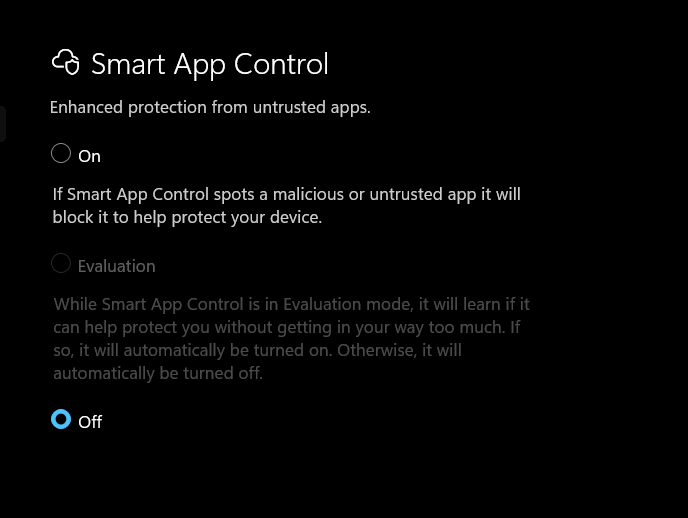
Proceed with the installation
Locate the
Setup.exefile for Embroidery Studio.Right-click it and select Run as Administrator.
If you are installing from a network drive or a USB, try copying the installation folder directly to your C: Drive first.
Side Note
You can leave the SAC ON option enabled.
This is to make sure that only install legit copies of installation files for any other software they require.
Enabled Smart App Control will still let you run the ES 2026 software.