Feature Transfer Error (Error - 1644)
Issue
ERROR - 1644 during Embroidery Studo 2026 software installation
Cause
Sometimes the "policy" is simply a lack of elevated permissions.
Required Information from you
From the affected PC, send the following details to the Support team.
1. Collect the *.nfo file - https://support.microsoft.com/en-au/help/300887/description-of-microsoft-system-information-msinfo32-tool
2. Provide the email address used to register the Embroidery Studio 2026
3. The customers Windows account must have admin rights to execute the installation.
Solution/Workaround
Switch off the SMART APP CONTROL
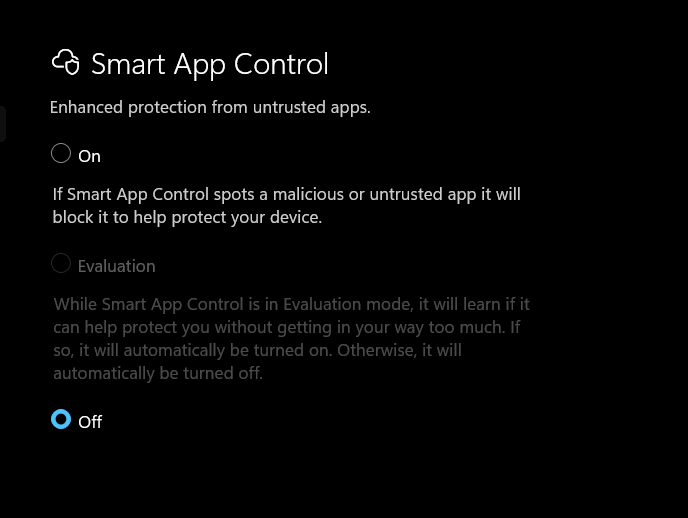
Proceed with the installation
Locate the
Setup.exefile for Embroidery Studio.Right-click it and select Run as Administrator.
If you are installing from a network drive or a USB, try copying the installation folder directly to your C: Drive first.
Side Note
You can leave the SAC ON option enabled.
This is to make sure that only install legit copies of installation files for any other software they require.
Enabled Smart App Control will still let you run the ES 2026 software.
Related Articles
Feature has expired H0041
For the issue, "Feature has expired (H0041)" when opening ES 2026, please follow the STEPS provided below. Open the Windows Task manager, locate Embroidery Studio 2026. Use this tool to end the task Open your internet browser to open this link ...Error SFTP Operation Failed. ComponentActivator could not instantiate EClib.Model.SFTP.DeviceUnmountTransaction
Error Message - Error SFTP Operation Failed. ComponentActivator could not instantiate EClib.Model.SFTP.DeviceUnmountTransaction Solution: Update your EmbroideryStudio e4.5 and ensure that the EmbroideryConnect device has the latest Firmware running ...If Embroidery Studio software crashes or shows a System Error too often, please send an Issue Report
IMPORTANT: Please make sure you quoted the Dongle tag number in the issue report form, so we can find your user account and the details of your ES e4/ ES DE HL software in our system. With ES 2026/ES 2025/ES DE/ES DE HL/ES e4, we implemented a new ...System time has been altered error (H0045) - Embroidery Studio Digital Edition
Security Error: In Wilcom EmbroideryStudio Digital Edition, error H0045 specifically refers to a HASP_TIME_ERR. This is a security feature of the Sentinel LDK license manager that triggers if it detects that the computer's clock has been moved ...EWA API technical notes
Wilcom’s Embroidery Web API is a cloud-hosted, RESTful interface that enables developers to integrate professional embroidery design and personalization features into websites, e-commerce platforms, or internal systems. The API supports rendering, ...